

Step-by-Step Guide: How to Lease a Copier

February 10, 2026
 0 views
 0 comments
How to Lease a Business Copier: A Step‑by‑Step Guide for Your Company
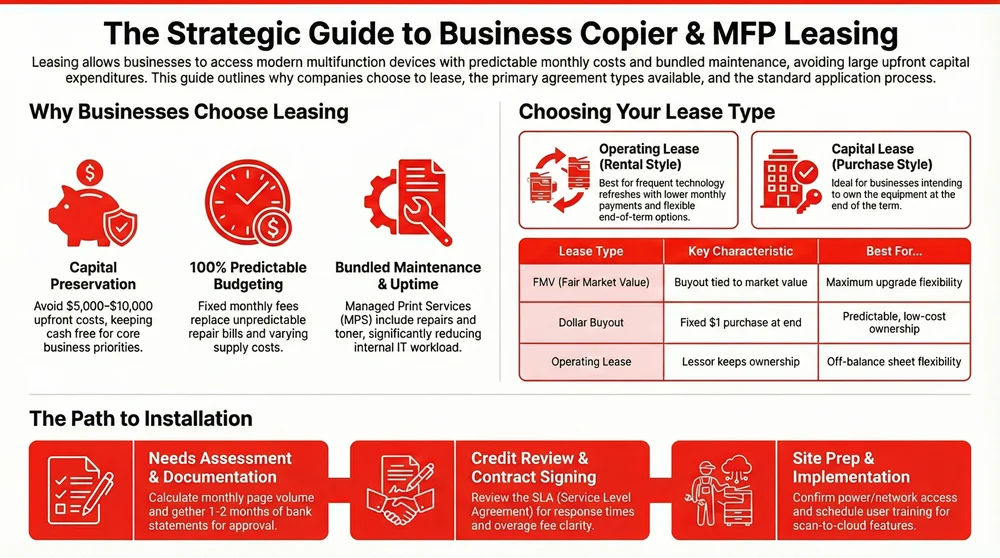
Leasing a business copier gives your company access to current multifunction devices without a large upfront purchase, with predictable monthly charges and optional bundled services. This guide walks you through how leasing works, the common lease types, what to expect during the application, how monthly costs are calculated, end‑of‑lease choices, and specialized options like MFPs and greener programs. Many organizations wrestle with cash flow, keeping technology current, and minimizing print downtime; leasing can ease those problems by shifting maintenance and upgrade responsibilities to the lessor while preserving working capital.
Read on for a clear, step‑by‑step application checklist, negotiation warnings, sample cost drivers that affect monthly payments, and a practical decision flow for upgrades or buyouts. The sections below cover definitions and benefits, a comparison of lease types, a detailed application walkthrough with required documents, a cost and inclusion breakdown, end‑of‑lease options, and solutions for small businesses, MFP productivity, and sustainability. We use common industry terms — lease term, residual value, service‑level agreement (SLA), Managed Print Services (MPS), and print volume — so you can negotiate confidently.

What Is a Copier Lease and Why Should Your Business Consider Leasing?
A copier lease is an equipment financing agreement where your business pays periodic rent for a copier or multifunction printer (MFP) instead of buying it outright. The lessor keeps ownership while you get use of the device, support, and often supplies. Financially, leasing preserves working capital and can offer off‑balance flexibility depending on the lease type. Leasing delivers three practical advantages: steady monthly costs that simplify budgeting, access to modern MFP features (cloud, mobile, security) that improve workflows, and bundled service or MPS options that reduce internal IT workload.
When weighing leasing against buying, consider upfront cost differences, tax treatment, and who handles maintenance — those factors determine the true total cost of ownership. The next section explains what leasing looks like for a typical office replacing aging equipment and offers a short scenario to illustrate cash flow and uptime effects.
What Does Leasing a Copier Mean for Your Business?
Leasing a copier means your team gets immediate access to printing, scanning, and finishing hardware while the provider handles maintenance and upgrades. That reduces downtime and keeps capital free for core priorities. Operationally, leasing supports continuity: SLAs and included maintenance speed repairs and keep machines running. Financially, monthly payments replace a single large purchase and can be aligned with your budgeting cycles.
For example, a small company that replaces a decade‑old device with a leased MFP can avoid a $5,000–$10,000 upfront purchase and instead pay a predictable monthly fee that often includes parts and service — freeing IT to focus on network issues rather than printer queues. This trade‑off helps businesses scale print capacity as they grow without taking on additional debt or tying up cash. Next, we list the key benefits leasing typically provides.
What Are the Key Benefits of Copier Leasing?
Leasing gives you predictable monthly costs, easier upgrades, and lower upfront capital needs through clearly defined contracts and service options. Below are the main advantages and why they matter when you evaluate copier leasing.
- Predictable monthly payments: Fixed fees make budgeting simpler and avoid surprise capital spending.
- Access to current technology: Regular refresh options let you adopt MFPs with cloud, mobile, and security features.
- Bundled maintenance and supplies: Service contracts or MPS reduce downtime and lighten IT overhead.
- Flexible lease structures: FMV or dollar‑buyout options let you balance ownership goals and cash flow.
- Eco‑friendly choices: Leasing can include energy‑efficient machines and recycling programs.
These advantages explain why many offices choose leasing over buying. The next section compares leasing and purchasing so you can decide which path fits your situation.
How Does Leasing Compare to Buying a Copier?
Leasing converts a capital expense into an operating expense, while buying turns the device into an owned asset. The best choice depends on cash flow priorities, whether you want ownership, and accounting or tax treatment. Buying means you own the machine, control end‑of‑life choices, and absorb maintenance and obsolescence risk. Leasing reduces obsolescence through term‑based refreshes and often includes maintenance to cut operational disruption.
Use this simple checklist: favor buying when long‑term ownership and asset value matter; favor leasing when you want to conserve cash, keep costs predictable, and maintain upgrade flexibility. For teams that expect to refresh every three to five years, leasing often lowers total cost once replacement cycles and bundled support are considered. That comparison leads naturally to selecting among specific lease agreement types, which determine end‑of‑term options and accounting effects.
This approach to acquiring capital equipment emphasizes flexibility and cash‑flow management, letting businesses use current technology without a large up‑front purchase.
Capital Equipment Leasing: Flexible Access and Cash Flow Management
Leasing capital equipment gives companies access to up‑to‑date technology without the burden of ownership. Typical agreements include maintenance and support so equipment stays operational and current. Leasing converts a large capital expense into predictable operating costs and provides an exit strategy at term end, making it easier to upgrade and stay competitive.
Capital equipment as a service: emerging models for equipment businesses in low and middle-income economies, 2016
What Are the Different Types of Copier Lease Agreements?
Lease types — operating lease, capital (finance) lease, Fair Market Value (FMV) lease, and dollar buyout lease — produce different financial and operational results, especially at term end. Some agreements act like rentals with return options; others are structured toward ownership. Choose the lease that matches your priorities: flexibility, ownership, or predictable buyout costs. The compact comparison below helps you match lease mechanics to business goals, followed by short explanations and real‑world examples.
That table shows how each lease maps to practical decisions. The following sections explain each type in more detail.
What Is an Operating Lease and How Does It Work?
An operating lease is essentially a long‑term rental: the lessor retains ownership and residual value risk while you pay for use and service. Monthly payments are typically lower because the lessor assumes residual risk, making operating leases attractive if you want regular technology refreshes and off‑balance flexibility. Common terms run 36–60 months to match typical MFP lifecycles. At term end you can usually return the equipment, renew, or buy at FMV. Operating leases pair well with Managed Print Services since bundled support simplifies daily operations and leaves upgrades and disposal to the vendor.
How Does a Capital Lease Lead to Ownership?
A capital (finance) lease is structured like a financed purchase: payments cover most of the asset value and the contract often includes a purchase option at residual or a nominal fee. For accounting purposes the asset and liability may appear on your balance sheet, and monthly payments are usually higher than an operating lease because the lessor transfers less residual risk. Businesses that want to own the equipment or gain tax benefits from depreciation often choose capital leases. When pursuing ownership, get a clear buyout clause and understand how residual value is calculated — those are key negotiation points.
What Are Fair Market Value and Dollar Buyout Leases?
FMV leases tie end‑of‑term buyout pricing to the device’s market value, giving you options to return, buy at FMV, or renew. FMV favors customers who want upgrade flexibility and typically lower payments because the lessor bears residual risk. Dollar buyout leases lock in a fixed, often nominal, purchase price at term end, which removes uncertainty and makes ownership costs predictable. Choose FMV for flexibility and lower monthly cost; choose a dollar buyout if you prefer certainty about eventual ownership costs. Your choice affects application strategy and negotiation during contract signing.
How Do You Apply for a Copier Lease? Step-by-Step Process Explained
Applying for a copier lease follows a straightforward sequence: assess needs, gather documents, request a quote, complete the credit review, sign the agreement, and schedule installation. Following each step reduces approval delays and helps ensure the leased device fits your operations. The checklist below turns those steps into actionable tasks and lists the documents that speed approval.

- Assess needs and choose device class: Estimate monthly page volume, color vs. mono, finishing, and MFP features.
- Gather documentation: Prepare business financials, tax ID, and authorized signer details before requesting a quote.
- Request a formal quote and submit the application: Provide device specs, desired term, and billing information for accurate pricing.
- Credit review and approval: Expect an initial conditional approval window; respond quickly to any document requests.
- Sign the agreement and schedule installation: Review the SLA, buyout language, and overage terms before you sign.
These steps set a clear path. The table below shows required documents, why each is needed, and tips to speed approval.
Providing complete documentation up front reduces back‑and‑forth. After approval, the next sections cover needs assessment, quote inputs, approval timelines, and what to expect at installation.
How to Assess Your Business Needs for Copier Leasing?
A clear needs assessment matches print volume, required features, security, and scaling expectations to the right device and service level — preventing overspend or undercapacity. Start by calculating monthly page counts for color and black‑and‑white, identify finishing needs (stapling, booklet mode), and list scanning, cloud integration, and mobile printing requirements that affect MFP selection and SLA levels. Include security needs such as secure print release and data‑at‑rest encryption if compliance matters. A concise needs profile yields better quotes and helps you decide if Managed Print Services make sense.
What Information Is Needed to Get a Copier Lease Quote?
To get an accurate quote you’ll need device specs, expected monthly page counts, desired lease term, billing and legal entity details, and credit references. Pricing depends on the equipment list price, residual assumption, term length, and whether maintenance and supplies are bundled. Supplying realistic usage estimates prevents later overage charges. Also include desired SLA response times and any network or security integration requirements in your initial request to avoid scope changes after installation.
What Are the Application and Approval Steps for Leasing?
After you submit a complete quote and application, the lessor runs a credit review and verifies documents. Expect conditional approval within a few business days and final approval once contracts are signed and any required deposits are provided. The credit review ties your business credit and financials to the proposed term and residual value; stronger financials can earn better rates or lower deposits. To speed approval, submit bank statements with the application, name an authorized signer, and respond promptly to requests from the leasing company. Knowing typical timelines and conditional triggers helps you schedule equipment replacement and avoid downtime.
Product‑as‑a‑Service (PaaS) ideas apply well to MFPs, enabling proactive management and lease offers designed around agreed service levels.
Product-as-a-Service for MFPs: Proactive Resource Management and Lease Offer Design
This paper examines Product‑as‑a‑Service models that proactively manage MFP availability through predictive analytics and adaptive service scaling. The approach combines automated resource allocation with constraints programming to design lease offers that meet predefined risk thresholds, improving availability while using resources efficiently. The findings are useful for designing reliable MFP lease and service packages.
Proactive Resource Maintenance in Product-as-a-Service Business Models: A Constraints Programming Based Approach for MFP Offerings Prototyping, E Szwarc, 2024
How to Understand and Sign Your Copier Lease Agreement?
Before signing, check key contract clauses: lease term, buyout options, included maintenance, overage fees, early termination penalties, and any auto‑renewal language. Negotiate levers such as capping annual price escalations, clarifying SLA response times, and specifying which consumables are included. Watch for red flags like vague response commitments, hidden admin fees, or unclear end‑of‑lease procedures — those can raise your total cost. A careful review and some negotiated protections keep your budget predictable and vendor performance aligned with expectations.
What Happens During Installation and Setup?
Installation covers delivery, physical setup, network integration, security configuration, and user training. Providers typically run first‑use tests and confirm that scan‑to‑cloud and mobile printing work properly. Prepare the site by confirming space and power availability, supplying network credentials, and arranging user accounts for authentication features to reduce install time. Technicians usually provide initial operator training and perform a first‑use verification to ensure print quality and finishing settings are correct. A smooth installation sets the stage for reliable ongoing managed print support.
When you’re ready for a formal quote or to start an application, Associated Imaging Solutions (AIS), based in the Philadelphia area with an office in Warminster, PA, offers copier leasing, rentals, repairs, and Managed Print Services. AIS highlights local responsiveness and personalized service, flexible lease options, modern MFP technology, and bundled maintenance and supplies to simplify operations. If you prefer a regional partner that offers flexible terms and eco‑friendly options, contact AIS through their online request portal and mention your device needs and preferred term when applying. That connects the guidance above to a local provider who can handle installation and support.
What Does a Copier Lease Include and How Are Costs Structured?
A typical copier lease includes the equipment, a lease term, and optional bundles such as maintenance, toner and supplies, service calls, and remote monitoring. Monthly payments reflect the equipment cost, lease term, financing charges, and assumed residual value. Pricing combines the capital cost, the lessor’s cost of funds, and residual assumptions. Including maintenance or supplies raises the monthly fee but reduces unpredictable out‑of‑pocket expenses and internal IT effort. The inclusion matrix below shows common services and whether they’re usually covered, plus how each typically affects monthly cost to help you evaluate quotes.
This table helps you weigh bundled services versus unbundled pricing. Often a slightly higher monthly payment for an inclusive plan lowers your total cost by reducing downtime and administrative burden. The next sections explain which supplies and services are commonly included, how monthly payments are calculated, and negotiation tactics to improve terms.
What Services and Supplies Are Included in a Copier Lease?
Inclusions vary by provider but commonly cover scheduled maintenance, on‑site repairs, firmware updates, and sometimes toner or consumables under an MPS agreement to stabilize operating costs and uptime. Bundled coverage transforms unpredictable repair and supply costs into predictable monthly charges, which helps budgeting and reduces IT interruptions. Typical exclusions include specialty paper, damage from misuse, or consumables beyond standard toner; clarify exact coverage in the SLA to prevent disputes. Choose a package that matches your print volume and response‑time needs to balance higher monthly fees against lower variable costs.
How Are Monthly Payments and Additional Costs Calculated?
Monthly payments come from the equipment’s capital cost minus expected residual value, amortized over the lease term with financing charges. Shorter terms raise monthly payments; higher assumed residuals lower them. Bundling maintenance increases the base monthly fee but reduces the chance of surprise repair bills. Additional costs can include overage per‑page charges, service calls for misuse, or late fees if payments are overdue — ask for a clear fee schedule to avoid surprises. Understanding these drivers lets you compare quotes on an apples‑to‑apples basis and find negotiation opportunities to lower long‑term spending.
Managed Print Services (MPS) are often central to copier leases, offering a unified way to control print infrastructure, costs, and device uptime.
Managed Print Services: Pricing, Contracts, and Customer Valuation
This study looks at MPS contracts and pricing, examining how providers and institutional customers interact. It finds customers’ print demand is generally insensitive to service price over observed contracts and shows that providers price contracts accounting for expected earnings and variability. The research highlights how MPS can standardize service valuation across different customers and fleet sizes.
Empirical study on managed print services pricing, J Ning, 2014
How Can You Negotiate Better Copier Lease Terms?
Negotiate to control total cost: clarify SLA response times, cap annual price increases, specify consumables included, and limit auto‑renewal or early termination penalties. Effective tactics include asking for a detailed fee schedule, requesting maintenance caps, comparing multiple quotes to create leverage, and negotiating a clear buyout formula or FMV testing method for end‑of‑term value. Avoid red flags like vague termination language, unspecified service response times, or hidden admin fees — insist on written SLA metrics and escalation paths to protect uptime. These steps preserve budget predictability and align vendor performance with operational needs.
As an example of a local provider model, Associated Imaging Solutions (AIS) lists maintenance, repairs, and supplies bundling among its strengths and offers flexible leasing with responsive local support. If bundled coverage and on‑site service are priorities, a provider that combines leasing, repairs, and Managed Print Services can reduce your internal workload for print fleet management.
What Are Your Options at the End of a Copier Lease?
When your lease ends, the usual choices are: return the equipment, buy it out, upgrade to new equipment, or renew under new terms. Each has pros and cons depending on your technology needs and financial goals. Decisions hinge on residual value, contract terms, and whether you want new features or prefer ownership. Start planning 6–12 months before expiry so you have time to evaluate performance, compare market options, and budget. The short list below gives a quick pro and con for each option to help you weigh them.
- Return the equipment: Pro — no ownership obligations; Con — possible return‑condition fees.
- Buyout the lease: Pro — you own the device; Con — may require a larger cash outlay or financing.
- Upgrade to new equipment: Pro — get newer features and warranties; Con — transition costs and new terms.
- Renew the lease: Pro — continuity with known equipment; Con — may mean higher monthly costs or fewer upgrade options.
Use this summary to build a timeline and criteria for choosing to renew, upgrade, or buy out as lease expiry approaches.
What Are the Common End-of-Lease Choices?
Returning equipment removes ownership responsibility and can be the simplest path if you plan to upgrade, but watch for clauses about machine condition and reconditioning fees. Buying out gives ownership certainty and can be cost‑effective when the residual price is low versus replacement cost, but it may require arranging purchase financing. Upgrading at term end supports productivity gains with newer MFP features but requires coordinating trade‑in or return logistics to avoid downtime. Renewing extends your current arrangement and can work when performance is acceptable and budgets favor continuity — evaluating these trade‑offs early smooths the transition.
How Should You Plan for Lease Renewal or Equipment Upgrades?
Begin planning 6 to 12 months before lease expiry: collect device performance metrics, compare current capabilities to your needs, and solicit competitive quotes for upgrades or buyouts. Look at print volume trends, security and cloud feature gaps, and whether new finishing or scanning options would deliver measurable benefits. Build a timeline that includes notice deadlines to the lessor, procurement lead times, and installation windows so you avoid operational gaps. Early planning helps you choose the end‑of‑lease option that best balances cost, productivity, and technology fit.
Associated Imaging Solutions (AIS) is one example partner that can help at lease end with upgrade, renewal, or buyout options. A local vendor that offers product selection guidance, repairs, and Managed Print Services can simplify trade‑in logistics and deployment. Choosing a provider with local expertise, bundled support, and eco‑friendly disposal practices can reduce admin overhead and align upgrades with your broader IT refresh schedule.
How Can Specialized Copier Leasing Solutions Benefit Your Business?
Specialized leasing — small‑business agreements, MFP leasing, and eco‑friendly programs — tailors contract structure and service levels to your operational needs, improving productivity while controlling costs. Small businesses often need low upfront cost and scalable terms; office environments benefit from MFP features like scan‑to‑cloud and advanced finishing; sustainability‑focused organizations prioritize energy‑efficient devices and recycling programs. The following subsections explain advantages for small firms, productivity gains from MFPs, and common eco‑friendly leasing options so you can match solutions to priorities.
What Are the Advantages of Copier Leasing for Small Businesses?
For small businesses, leasing lowers the barrier to modern MFPs by removing large capital expenditures and offering predictable monthly cash flow that supports growth. Leases are scalable so you can increase capacity as you expand, and bundled maintenance or MPS reduces pressure on small IT teams by outsourcing repairs and supplies. For example, a three‑office firm that replaces old printers with leased MFPs can cut initial cash outlay while gaining centralized scanning and cloud integration for faster invoice processing. Those benefits make leasing attractive when you’re balancing limited resources and evolving technology needs.
How Does Multifunction Printer Leasing Enhance Office Productivity?
Leasing an MFP brings together scanning to cloud, mobile printing, secure release, and advanced finishing to streamline document workflows and reduce manual tasks. Scan‑to‑cloud plus OCR can speed invoice processing by creating searchable digital records, while finishing options automate stapling and booklet jobs previously done by hand. Security features like user authentication and encrypted storage protect sensitive documents and help with compliance — especially important for remote work. Leasing MFPs with these capabilities delivers measurable productivity improvements without large upfront investment.
What Eco-Friendly Copier Leasing Options Are Available?
Eco‑friendly leasing focuses on energy‑efficient devices, toner recycling programs, and scheduled refreshes that replace inefficient machines with lower‑consumption models. Energy Star‑rated copiers and toner reclamation reduce environmental impact and can be bundled in lease terms to make sustainability simple. Leasing supports sustainability by enabling planned upgrades to more efficient hardware during the contract lifecycle, preventing extended use of energy‑hungry, obsolete devices. Choosing a lease with recycling and energy‑efficiency commitments helps meet corporate sustainability goals while managing print costs.
- Energy‑efficient devices: Newer copiers use less power and have better sleep‑mode behavior.
- Recycling programs: Toner and cartridge reclamation keeps consumables out of landfills.
- Planned refresh cycles: Regular upgrades move fleets to more efficient hardware.
These eco‑friendly options align with operational goals and complete the practical guidance you need to evaluate copier leasing and pick the right path for your business.
Frequently Asked Questions
What factors should I consider when choosing a copier lease type?
Consider your cash flow, how often you plan to upgrade, and whether you want ownership at term end. Operating leases give lower monthly payments and easier upgrades; capital leases are better when you want to own and capture depreciation. Also factor in expected usage, maintenance needs, and your technology refresh cycle to pick the lease that fits your long‑term plan.
How can I ensure a smooth installation process for my leased copier?
Prepare the installation site: confirm space, power, and network access. Share security configuration and user access requirements with the provider in advance, coordinate with your IT team, and schedule training for operators. Clear site prep and good communication with the vendor keep installation quick and trouble‑free.
What should I do if I encounter issues during the lease term?
First, check your SLA to see what support is covered. Contact your leasing provider’s support team, document the issue, and follow escalation steps if needed. Keep communication open with the provider so problems are resolved quickly and service levels are met.
Are there any tax benefits associated with leasing a copier?
Yes. Lease payments are often treated as operating expenses and may be deductible, which can lower taxable income. Capital leases can offer depreciation benefits in some cases. Consult your tax advisor to understand how lease accounting and tax rules apply to your business.
How can I evaluate the total cost of ownership for a leased copier?
Look beyond monthly payments: include maintenance, supplies, overage charges, and any buyout costs. Factor in uptime improvements, reduced IT time, and the value of newer features. Comparing all these items gives a clearer picture of the true cost over the lease term.
What are the common pitfalls to avoid when leasing a copier?
Don’t rush the contract review. Watch for hidden fees, vague SLA language, unclear overage terms, and automatic renewals. Compare multiple quotes, ask for a detailed fee schedule, and negotiate the SLA and buyout terms to avoid surprises down the road.
Related Posts

— Managed Print Services for Philadelphia Businesses
— Copier Leasing in University City, Philadelphia