


Enhanced Print Security with Managed Print Services

January 27, 2026
 0 views
 0 comments
Strengthen Print Security with Managed Print Services: Protect Your Business Printing Environment
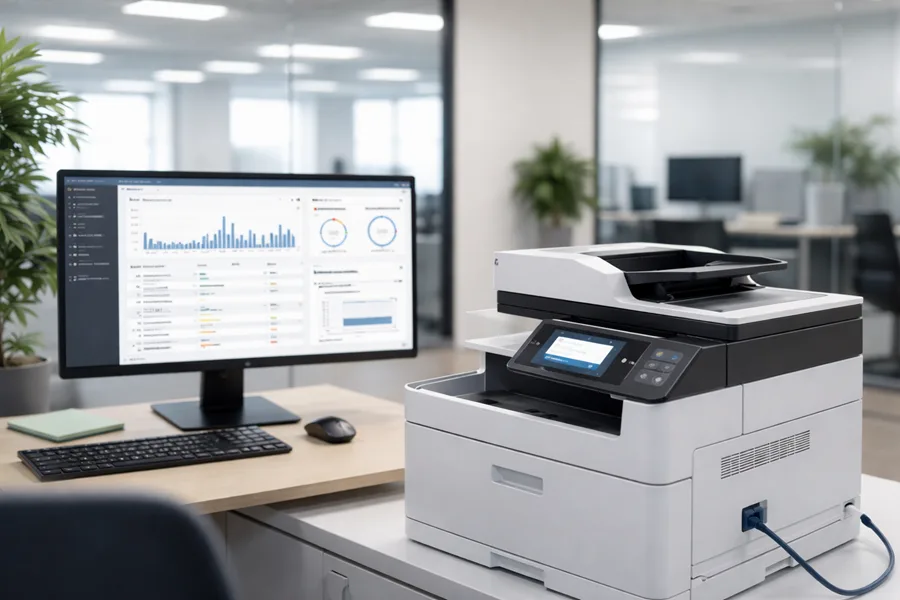
Printers and multifunction devices are easy to overlook — yet they can hold or expose sensitive data. Our managed print services (MPS) layer policy, technology, and day-to-day operations to shrink that risk and keep your printing environment secure. This article walks through the main print security threats organizations face, the MPS controls that neutralize them, and how logging and monitoring support compliance and fast incident response.
You’ll get practical steps to secure your fleet — from authentication and encryption to patching, network segmentation, and audit-ready reporting — plus measurable outcomes from disciplined MPS programs. We also map controls to HIPAA, PCI DSS, and GDPR, share anonymized regional examples of faster remediation, and explain what a local provider brings in response SLAs, eco-conscious device handling, and cost-effective fleet optimization. Expect clear lists, comparison tables, and tactical guidance you can use right away.
What Are the Biggest Print Security Threats Facing Businesses Today?
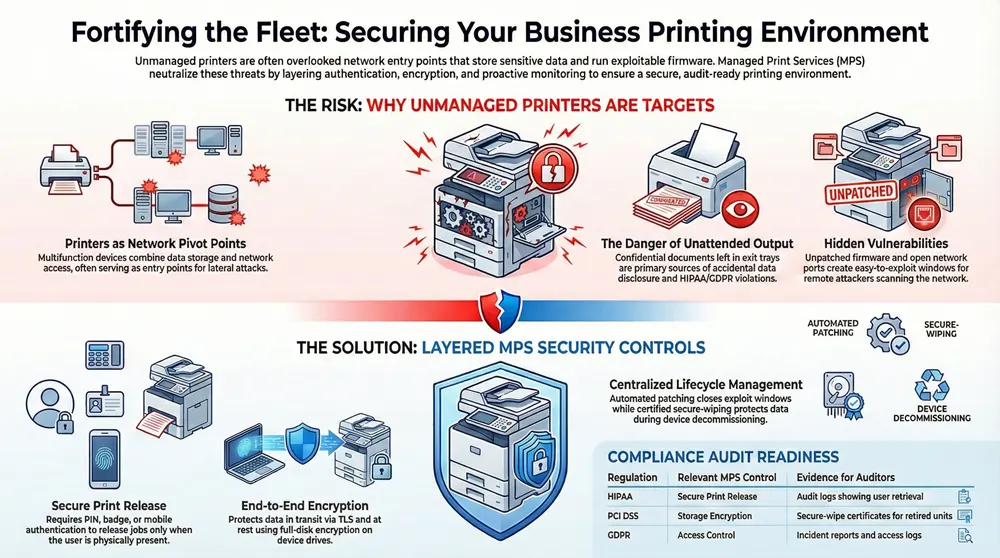
Printers combine data storage, firmware, and network access in one box — and that makes them attractive targets. Unattended output can expose confidential documents, unpatched firmware can allow remote exploits, and poorly controlled network printers can become pivot points into core systems. Hybrid work and mixed-vendor fleets add management complexity and increase the chance of unmanaged devices or inconsistent telemetry. Recognizing these risks is the first step to prioritizing fixes and choosing secure devices and services.
Below are the top threats most organizations should triage first, with a focused mitigation for each.
- Unattended prints and insecure release: require secure print release and user authentication to stop accidental disclosure.
- Unpatched firmware and vulnerable MFP OS: use centralized patching and device hardening to close exploit windows.
- Network-exposed printers and open ports: apply segmentation and ACLs to limit lateral movement.
- Local storage compromise (HDD/SSD on MFPs): enforce encryption-at-rest and formal secure-wipe procedures at decommissioning.
These items form a prioritized starting checklist. Next we detail common vulnerabilities in unmanaged fleets and the cost and compliance impact when they’re left unaddressed.
What Common Vulnerabilities Exist in Unmanaged Print Environments?
Unmanaged fleets often share predictable weaknesses: default or weak admin passwords, exposed network ports, no authentication on print release, and persistent local job storage. Attackers scanning a network can spot printers with open services and exploit known firmware or management interface flaws. Internally, staff can inadvertently expose PHI or payment data by leaving trays unattended. Fixes start with baseline hardening — change defaults, disable unused protocols, enforce authentication — then move to centralized management to stop configuration drift. That foundation makes later steps like DLP integration and automated patching practical and effective.
Left untreated, these weaknesses create measurable impacts. The next section explains how print-related breaches translate into cost and compliance consequences.
How Do Print-Related Data Breaches Impact Business Costs and Compliance?
Print-related incidents create costs across incident response, forensics, potential fines, and operational downtime — plus reputational harm that can erode customer trust. Regulated organizations that can’t show secure handling of PHI or cardholder data may face investigations and penalties, alongside expenses for notification and credit-monitoring. Operationally, isolating and rebuilding devices interrupts workflows and reduces productivity. Proactive MPS controls — encryption, audit logs, secure release, and secure decommissioning — lower expected incident impact and provide the evidence auditors and insurers expect.
To avoid these losses, the next major section shows how managed print services implement controls that harden your print environment.
How Does Managed Print Services Fortify Print Security for Businesses?
Managed Print Services (MPS) reduce risk by enforcing device configuration baselines, centralizing policies, managing device lifecycles, and continuously monitoring activity. Core controls include secure print release with user authentication, encryption of jobs and device storage, automated patch management, network segmentation for printer traffic, and collection of job logs for audit and anomaly detection. Together these controls turn dispersed printers into a managed, auditable part of your security posture and produce measurable reductions in exposure through SLAs and routine operations. Below we unpack each control and summarize its business value.
MPS providers deploy these controls with agents, secure print servers, and policy-driven configurations to ensure consistent enforcement across mixed fleets and reduce configuration drift.
- Authentication and secure print release: holds jobs until the verified user collects them, preventing unattended output.
- Encryption (in transit and at rest): protects print jobs in transit and stored data on MFPs.
- Patch and firmware management: centralizes critical updates to close known vulnerabilities.
- Network segmentation and ACLs: restricts printer access to required services and limits lateral movement.
- Monitoring and auditing: aggregates job logs and alerts to support detection, forensics, and compliance reporting.
These controls work together to deliver measurable security benefits. The table below summarizes each feature, how it works, and its business value.
Different MPS features map directly to mitigation outcomes and compliance evidence.
This comparison shows how each mechanism lowers risk and supports auditability. In practice, providers that pair technical controls with operational SLAs and local resources shorten remediation times and shrink exposure windows.
Associated Imaging Solutions uses these same patterns in our managed print services — local expertise, 24/7 support, device management, and flexible leasing to enforce secure configurations and speed patching. If you’d like an outside view, you can request a security assessment to identify priority gaps and next steps.
What User Authentication Methods Secure Print Release Systems?
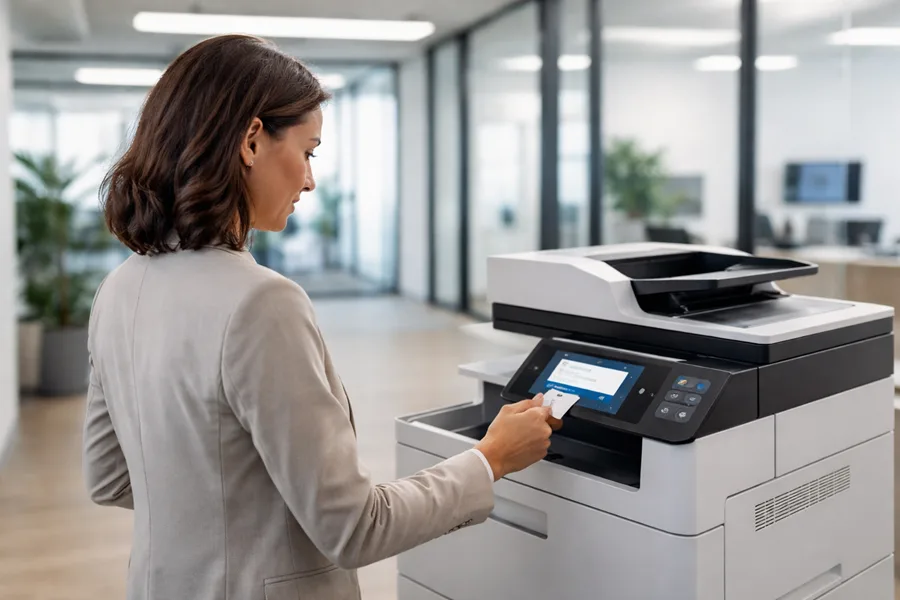
Secure print release verifies the intended recipient before releasing a job. Common methods include PIN entry, badge/RFID swipe, mobile authentication, and biometric options. PINs are simple and reduce unattended prints; badge systems tie into access control for stronger user-job linkage. Mobile authentication adds convenience and reduces hardware contact, while biometrics offer higher assurance where policy requires it. Integrations with identity providers (LDAP, SAML) and SSO reduce admin overhead and help balance security with user experience.
Picking the right method depends on your risk profile and user patterns. Next we explain how encryption complements authentication by protecting the data itself.
How Does End-to-End Data Encryption Protect Printer Data?
End-to-end encryption protects print data both in transit — via TLS or IPsec between workstations, print servers, and devices — and at rest using MFP drive encryption or secure storage options. Encrypting print streams keeps intercepted jobs unreadable, and full-disk or file-level encryption stops document recovery from decommissioned drives. Secure-erase and cryptographic wipe policies are essential at end-of-life to avoid residual-data exposure during recycling or redeployment. Together, these practices preserve confidentiality and support regulatory requirements for sensitive data protection.
Next: why keeping firmware current matters for reducing exposure.
Why Are Firmware Updates and Patch Management Critical for Printer Security?
Firmware and MFP OS code can contain vulnerabilities attackers exploit remotely. Regular patching and controlled firmware updates close those paths. Good MPS patch management centralizes scheduling, tests updates in staging to avoid workflow impact, and supports rollbacks when needed. Automated deployment across mixed fleets reduces manual mistakes, while inventory tracking highlights unsupported devices that should be replaced. Faster patching reduces dwell time and, combined with monitoring, shortens containment windows for incidents.
Firmware hygiene is most effective when paired with network controls that isolate printers from sensitive systems.
How Does Network Segmentation Improve Network Printer Security?
Network segmentation places printers on dedicated VLANs or subnets and uses ACLs to limit which hosts can talk to them. A typical approach isolates printers in a print VLAN that allows only print server traffic, management access for authorized technicians, and specified admin subnets — while blocking user endpoints and critical application servers. Segmentation reduces a compromised device’s blast radius and makes print traffic easier to monitor. Combined with firewall rules and secure management channels, segmentation is a practical barrier that complements device hardening and authentication.
Segmentation’s value depends on good monitoring and logging to detect anomalies and validate controls.
What Role Does Monitoring and Auditing Play in Print Security?
Monitoring and auditing answer the who/what/when/where of printing: job logs, admin activity trails, and alerts feed incident response and compliance reporting. MPS platforms aggregate logs into centralized dashboards, apply rules to surface abnormal volumes or access patterns, and produce audit-ready reports for regulators. Those logs are essential for forensics, proving policy enforcement, and demonstrating controls during audits. Continuous monitoring also reveals trends that help teams prioritize risky devices or configurations.
With these controls in place, organizations can map their print posture to regulatory requirements and gather the evidence auditors expect.
How Can Managed Print Services Help Your Business Meet Compliance Requirements?
Yes — managed print services help organizations meet compliance by implementing and documenting controls aligned with regulatory expectations for confidentiality, integrity, and auditability. MPS contributes secure print release, encryption, access controls, standardized device baselines, patch management, and retained audit logs that serve as assessment evidence. Mapping those controls to regulatory criteria and producing artifacts like configuration baselines and job logs lets MPS support both prevention and post-incident proof. Below is a practical mapping of common regulations to the MPS controls and artifacts auditors look for.
This mapping shows how technical and operational controls produce the artifacts auditors need. Next we explain how a managed model reduces legal and financial risk.
Which Industry Regulations Does AIS MPS Support for Print Security?
Standard MPS setups support common frameworks by delivering the technical controls and evidence auditors expect. For HIPAA, secure release and encryption limit PHI exposure while logs document access; for PCI DSS, encryption and secure drive handling reduce cardholder data retention; for GDPR, access controls and minimized retention help manage personal data and notification obligations. Associated Imaging Solutions configures services around these control patterns with local support, configuration management, and 24/7 monitoring — helping you collect logs and baselines that serve as audit artifacts while leaving policy and compliance decisions with your organization.
Those controls translate directly into reduced liability, which we cover next.
How Does Print Security Compliance Reduce Risk and Liability?
Documented print security controls show auditors and regulators that reasonable steps were taken to protect sensitive data, lowering the chance and potential severity of fines. From a civil-risk perspective, clear controls and incident timelines help limit litigation exposure and support insurance claims by demonstrating timely detection and remediation. Operationally, compliance-focused MPS reduces breach impact with preventive controls and speeds response with structured playbooks. Integrating MPS artifacts — baselines, retention rules, and logs — into your governance programs strengthens contractual positions with partners and helps maintain customer trust.
Next we outline the specific advantages a local provider offers for secure managed print services, including faster remediation and eco-conscious handling.
What Unique Advantages Does Associated Imaging Solutions Offer for Secure Managed Print Services?
Associated Imaging Solutions (AIS) combines security-first MPS with practical local advantages: on-site expertise for quick remediation, 24/7 technical support to lower exposure windows, flexible leasing for timely device refreshes, modern devices with built-in security, cost-saving fleet consolidation, and certified eco-friendly decommissioning. Rapid on-site response and local knowledge of networks and regulations shorten the time to patch or replace compromised hardware. AIS blends technical controls with SLA-backed operations to keep mixed fleets secure while addressing sustainability and cost optimization.
- Local field remediation and hardware replacement to minimize downtime and exposure.
- SLA-driven monitoring with 24/7 support to escalate suspected compromises outside business hours.
- Flexible leasing and device refresh programs to replace unsupported hardware and reduce total cost of ownership.
These service attributes shorten time-to-remediate and help organizations match secure device lifecycles to budgets. The sections that follow expand on local support and eco-cost benefits.
How Does Local Expertise and 24/7 Support Enhance Print Security?
Local technicians shorten the time between detection and remediation — applying patches, replacing compromised units, or performing secure wipes faster than remote-only providers. Around-the-clock support ensures alerts and anomalies are escalated continuously, reducing threat dwell time and enabling quicker containment. Local teams also bring contextual knowledge of regulatory needs and network topology, improving coordination with internal IT for segmentation and access changes. That proximity and responsiveness matter most for regulated industries that need swift evidence collection and documented remediation.
These operational strengths pair naturally with cost and sustainability measures that further reduce risk.
What Eco-Friendly and Cost-Effective Solutions Does AIS Provide?
AIS focuses on fleet consolidation and right-sizing to lower device count — and with it, the attack surface and management overhead. Fewer, properly configured devices are easier to secure and monitor. Certified secure decommissioning and recycling reduce residual-data risk while supporting environmental goals. Energy-efficient devices lower operating costs and often include better encryption and firmware-update capabilities. Consolidation and leasing also create predictable budgets for secure refreshes, avoiding the security risk of aging, unsupported hardware.
Next we share anonymized examples that show measurable security improvements from disciplined MPS deployments.
What Are Real-World Examples of Successful Print Security with Managed Print Services?
Well-executed MPS deployments produce measurable gains: fewer incidents, faster patch cycles, and stronger audit readiness. The case teasers below show typical before/after results without identifying clients. Common improvements include big reductions in unattended prints, shorter time-to-patch, and clearer audit trails. MPS also helps rationalize fleets, lowering costs while improving security through fewer targets to manage. The table below summarizes these outcome metrics.
These anonymized examples show the operational improvements organizations can expect after adopting disciplined MPS controls.
These scenarios show that a structured MPS program improves both security controls and operational outcomes. The next sections add regional context and supporting industry data.
How Have Philadelphia Businesses Improved Security with AIS MPS?
Philadelphia organizations using structured MPS typically see faster remediation thanks to local technician dispatch, clearer audit trails from centralized logging, and better compliance posture after consolidating devices and enforcing baselines. Secure print release and encryption often deliver quick wins — immediate drops in unattended prints and greater staff confidence handling sensitive documents. Local 24/7 support shortens escalation windows so patches and replacements happen predictably, and leasing options let teams replace end-of-life hardware without large capital outlays. Those operational benefits reduce incident response time and strengthen audit evidence.
Next, a look at industry statistics that underline why print security deserves attention.
What Industry Statistics Highlight the Importance of Print Security?
Recent studies show networked peripherals, including printers, increasingly play a role in breach investigations. Organizations still find sensitive data on unmanaged device storage or leaked via unsecured printing. Misconfiguration and missed firmware updates remain common causes of lateral movement in breaches, and smaller organizations are often hardest hit when combined with limited response resources. These trends underscore patch management, secure-release, and audit logging — the core controls of MPS — and validate investments in managed printing security.
With these examples and stats in mind, the final section answers common questions decision-makers ask about print security and MPS.
Frequently Asked Questions
What are the key benefits of implementing Managed Print Services (MPS) for print security?
MPS centralizes control of your print environment: secure print release, encryption, and regular firmware updates. It adds continuous monitoring and auditing so you can detect anomalies and respond quickly. Standardized device configurations and enforced policies reduce breach risk and support regulatory compliance. In short, MPS helps keep printing secure, efficient, and cost-predictable.
How can organizations assess their current print security posture?
Start with a full inventory of devices, then review configurations for weak credentials, open ports, and unpatched firmware. Evaluate authentication methods and encryption practices. A third-party assessment can provide objective findings and prioritized recommendations, making it easier to plan remediation and reduce exposure.
What role does user training play in enhancing print security?
User training is essential. Teach employees why secure print release matters, how to handle sensitive prints, and how to spot social-engineering attempts. Clear procedures for disposing printed materials and routine refreshers reduce human error and make technical controls more effective.
What are the potential consequences of neglecting print security?
Neglect can lead to data breaches that cause financial loss, regulatory fines, operational disruption, and reputational damage. Compromised devices can slow workflows and expose sensitive information, undermining customer trust and creating long-term liability.
How does encryption contribute to print security?
Encryption protects print jobs in transit and data at rest on device drives. Encrypted streams stop eavesdroppers from reading intercepted jobs, and drive encryption plus secure erase prevents recovery of documents from retired devices. Encryption is a key control for both security and compliance.
What should organizations look for when choosing a Managed Print Services provider?
Choose a provider with proven security controls (encryption, secure release, monitoring), flexible solutions tailored to your needs, strong local support, and a commitment to sustainability and cost efficiency. Confirm they can produce configuration baselines and logs auditors will expect, and that their SLAs match your risk tolerance.
How Do Managed Print Services Prevent Data Breaches?
MPS reduces breach risk by combining technical controls — secure print release, encryption, and firmware management — with operational processes like centralized logging, configuration baselines, and scheduled audits. That layered approach closes common exposure paths and creates the evidence trail needed for quick forensics and regulatory response.
That capability ties back to why networked printers deserve attention, which we summarize next.
Why Are Network Printers a Cybersecurity Risk?
Network printers pose risks because they run firmware, may retain print jobs on internal drives, expose administrative interfaces, and often sit on networks without tight access controls. Combined with lax patching and default credentials, printers become attractive low-effort targets. Effective mitigations include firmware patching, enforced authentication, secure-release, and network segmentation to limit attacker movement.
This article combined practical and operational guidance to harden print environments with managed print services, mapped controls to compliance requirements, and showed how a local provider like Associated Imaging Solutions can speed remediation and support sustainable, secure device lifecycles.
Related Posts

— Managed Print Services in Delaware Valley

— Managed Print Services for Philadelphia Businesses